

Google Merchant Center Video: Add and Verify It
Learn when to use Google Merchant Center video_link versus Video assets, and how to check the right route without assuming approval or display.

How to Use and Verify a Product Video in Google Merchant Center
If you already have a product video and want it inside Google Merchant Center, the first decision is not a technical one. It is a route decision. Google Merchant Center gives you two separate paths for a product video: submitting a video_link as structured product data, or letting Video assets discover and review a video through its own workflow. Confusing the two leads sellers to check the wrong screen for the wrong signal. This guide walks through both routes and the verification step that belongs to each one.
If your video still has burned-in subtitles that need translating before you use it, you can review how to translate burned-in subtitles in short-form product videos as an optional preparation step. That guide does not make a video Merchant Center-ready, and it has no effect on submission, hosting, mapping, or eligibility.
Key Takeaways
video_linkis an optional product-data attribute you submit yourself. Video assets is a separate discovery and review surface reached through Creative content.- Meeting
video_link's technical requirements does not guarantee that a video will serve or display. - A
video_linksubmission is verified through processed-product status and Needs attention, not through the Video assets gallery. - The Video assets
Your videosgallery is curated and can omit a video without that meaning anything about avideo_linksubmission. - Always recheck current Google Merchant Center documentation before you rely on any requirement here, since these are live specifications that can change.
Use video_link when you are submitting product video data
video_link is an optional attribute in your product data feed, documented by Google as a way to provide product visuals beyond your image attributes (Google Merchant Center Help: Video link). You use it when you want to submit a specific video URL as part of a product's structured data, the same way you would submit a title, price, or image link.
The URL itself has documented conditions. It must use HTTP or HTTPS. If it is not a YouTube URL, it must resolve directly to a raw, supported video file rather than to a page that embeds one. The video must be publicly accessible, crawlable, and stable, meaning it cannot sit behind a login or be blocked by restrictive robots rules.
Google's current documentation also lists technical bounds for the file itself: a duration between 6 and 240 seconds, a maximum size of 500 MB, a minimum resolution of 720p, and an aspect ratio of 9:16, 16:9, or 1:1. There are also ownership and content conditions attached to the attribute, which are part of the same live specification.
Treat all of these as a preflight checklist, not a guarantee. Meeting every technical requirement means your video_link is well-formed. It does not mean the video will be approved, displayed, or served, since Merchant Center evaluates submitted data separately from what ultimately reaches shoppers.
If the video's on-screen text still needs review before you submit it, how to remove subtitles from a video can help you assess whether visible text should come out first. This is an optional source-asset check, not a Merchant Center requirement, and it has no bearing on video_link approval or serving.

Use Video assets to review discovered website or YouTube video
Video assets is a different part of Merchant Center, reached through Creative content and then Video assets. Google describes it as a surface for viewing, managing, and distributing video content that has been sourced separately from your product-data feed (Google Merchant Center Help: About Video assets).
This surface handles two distinct sources differently. Videos found on your website are documented as being automatically mapped to relevant product offers. Videos recommended from YouTube go through a review step, where you can accept, modify, or reject the recommendation; the documented workflow allows one selected product offer per video.
This is not the same workflow as submitting a video_link. Video assets aggregates and curates videos it discovers, rather than accepting a video URL you explicitly attach to a specific product in your feed. Because it is a discovery and review tool, its Your videos gallery is documented as curated, which means it can omit source videos that exist elsewhere.

Verify the route you used, not a different screen
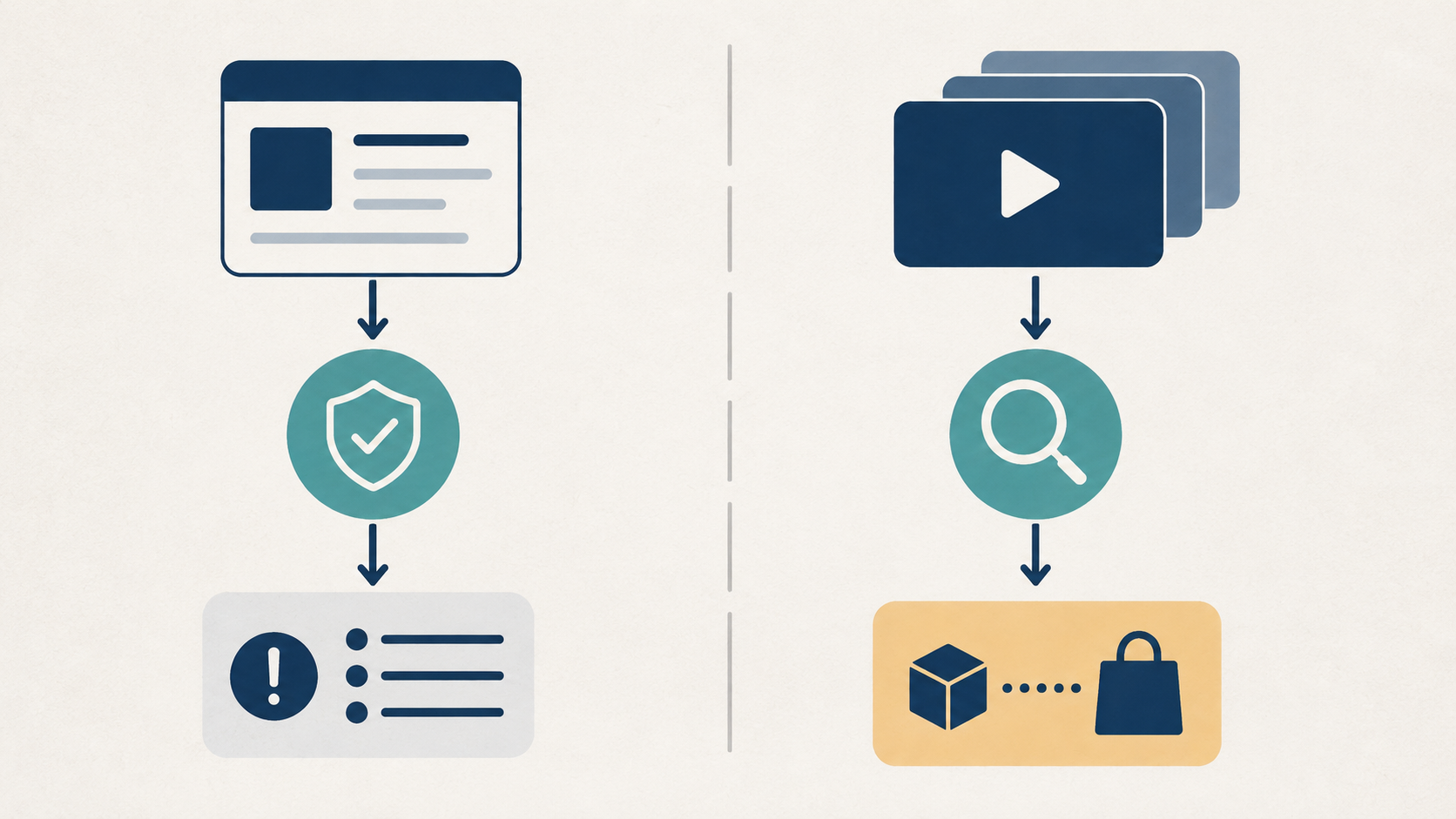
Once you know which route you used, the verification step should match it. The two routes have different documented checks, and neither one substitutes for the other.
| Route | What it represents | Documented check | What the check cannot prove |
|---|---|---|---|
video_link | A product-data attribute you submitted for a specific product | Processed-product status, plus any video-related policy or quality warnings and errors surfaced in Needs attention | That the video is actually displayed to shoppers |
| Video assets | A discovered or reviewed video from your website or YouTube | Whether the video appears with the correct source and product-offer mapping inside Video assets | The status of a separate video_link submission for the same or a different product |
For video_link, the relevant check is on the product-data side. Google's 2026 update to Merchant Center product-data specifications explains that a submitted input differs from the processed product, and that the Merchant API reports reference and Needs attention are where video policy or quality issues surface (Google Merchant Center product data specification update 2026; Merchant API reports reference). The same update states that a video error can stop that specific video from serving without stopping the associated product offer from serving. That distinction matters: a healthy offer status is not proof that its video is being shown.
For Video assets, the relevant check stays inside that surface: is the source video present, and is it mapped to the product offer you expect. This says nothing about a separate video_link value you may have submitted for the same product.
This is also why an absent entry in the Video assets gallery is not a diagnostic for video_link. Because the gallery is documented as curated, a video can be missing from it for reasons unrelated to whether your video_link submission is valid, processed, or serving. Checking the wrong surface will not tell you what you need to know.
A practical preflight before you add or review a video
Before you add a video_link or go looking for a video inside Video assets, run through this sequence:
- Confirm ownership and rights. Only use a video you have the rights to submit, consistent with Google's documented content conditions.
- Confirm the URL is accessible. For a
video_link, check that the URL is HTTP(S), publicly reachable, crawlable, and stable, with a direct file link for non-YouTube sources. - Choose the correct route. Decide whether you are submitting product data through
video_linkor expecting Video assets to discover and map an existing website or YouTube video. - Confirm product relevance. Make sure the video corresponds to the specific product it will be attached to, whether through the feed attribute or through Video assets mapping.
- Check the matching verification surface. Use processed-product status and Needs attention for a
video_linksubmission, or the Video assets review screen for a discovered video, and do not substitute one for the other.
This checklist stays inside documented Merchant Center behavior. It does not include an account-specific UI test or a predicted eligibility outcome, since neither can be confirmed without direct access to your Merchant Center account.
If you are preparing the same video for more than one marketplace, an Amazon product video requirements pre-upload checklist covers a separate set of platform-specific requirements. Treat it as independent reading; Amazon's requirements do not apply to Google Merchant Center and should not be substituted for the checklist above.

Frequently Asked Questions
Is Video assets the same as video_link?
No. video_link is a product-data attribute you submit yourself, while Video assets is a separate surface, reached through Creative content, that discovers and reviews videos from your website or YouTube. They are complementary, not interchangeable (Google Merchant Center Help: About Video assets).
Does a missing Video assets gallery entry mean my video link failed?
No. The Video assets Your videos gallery is documented as curated, so it can omit a source video for reasons unrelated to a separate video_link submission. To check a video_link, look at processed-product status and Needs attention instead of the Video assets gallery (Google Merchant Center Help: About Video assets).
Does a successful submission mean the video will serve?
No. Meeting video_link's technical requirements or having a video appear in Video assets does not guarantee that the video will be approved, displayed, or served. Google's 2026 product-data update notes that a video policy or quality issue can stop a video from serving without stopping its associated product offer, which is a distinction worth checking directly in your account before assuming an outcome (Google Merchant Center product data specification update 2026).
Conclusion: Keep submission and discovery checks separate
Choosing the right Merchant Center route comes first: video_link for submitting product-video data, Video assets for reviewing discovered website or YouTube video. Each route has its own verification surface, and checking the wrong one, such as reading a curated Video assets gallery as a video_link status check, will not give you an accurate answer. Because these are live product specifications, recheck Google's current Merchant Center documentation before you submit, review, or rely on any requirement described here.
Remove the source subtitles, then add translated subtitles in one flow.
Start for free